Track ChatGPT model usage and archive local conversation records
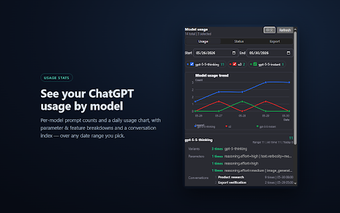
ChatGPT Model Usage Counter by bsnblanc.com is a Chrome extension that gives users clear visibility into their ChatGPT sessions, built for power users and prompt engineers. The app automatically counts prompts seen in the browser and presents per-model activity in interactive line charts for daily comparison. Dashboards highlight which model accounts for most activity and how use shifts over time. It targets researchers and heavy prompt users who need reliable per-model analytics for their workflows.
How your conversation data is handled and why it matters
The extension processes and stores conversation records entirely in the browser using chrome.storage.local, and nothing is uploaded to the publisher or third-party servers. That on-device model keeps analytics and archives local to the machine, which reduces exposure of sensitive prompts to external services. Local history indexing lets you locate the conversations that underpin the usage numbers, making it possible to verify or export specific sessions without sending data off-device.
What level of detail the analytics surface
The tool records granular request parameters such as reasoning effort, verbosity, and temperature, and logs prompt hashes and tools used. It also detects higher-level features like Deep Research, Agent Mode, and Canvas, so you can separate interactions by mode as well as by model. This granularity supports prompt engineering and research workflows that need to compare behavior across model variants and feature sets.
Which export and archival options are available
Conversation exports include JSON, Markdown, PDF, DOCX, and PNG, with PDF and Word outputs rendered to match ChatGPT's reading layout. Export fidelity preserves tables, code blocks, and CJK text, which helps when archiving technical threads or multilingual exchanges. High-quality exports let you move conversations into external documentation or offline archives without losing structural formatting.
Where it runs, who made it, and practical limits to expect
Published by bsnblanc.com, the extension runs on Chrome and other Chromium-based browsers and offers interfaces in English and Chinese. Community commentary highlights clean integration into the ChatGPT UI and a focus on privacy-centered analytics. The tool monitors local page activity rather than official platform metrics, so it does not act as an OpenAI billing or quota reader; it reflects what the extension observes in your browser page history.
A focused analytics tool best suited to power users and researchers
The extension is a specialist pick for prompt engineers, researchers, and heavy ChatGPT users who require precise, on-device analytics and archival exports. It is not intended to replace official usage or billing tools, so use it for behavioral analysis, prompt iteration, and record-keeping rather than quota reconciliation. Casual users who only need occasional history or basic search may find the data depth unnecessary.